Showing posts with label TSM. Show all posts
Showing posts with label TSM. Show all posts
Monday, February 16, 2015
TSM Rumor Mill
So I was talking with an IBM source about IBM's recent layoffs and she stated that many groups were being restructured and TSM was affected. According to my source she said that TSM is possibly going to have a name change. This is no shock for those who remember when TSM was called ADSM. A partial name drop was something along the lines of Specter blah blah blah!! So take this rumor with some reservations, but IBM is going through a major upheaval as IBM decides what its services path with be in the future.

Monday, January 12, 2015
Poll Results
The TSM Server usage poll closed Jan 1st and the results were interesting. See for yourself, but I thought the usage of 6.3 and 7.1 over 6.4 was interesting. I guess it's not worth going to 6.4 seeing as 7.1 is out???

Friday, August 29, 2014
TKLM - Things To Know Part 3
Identifying and Releasing Empty Volumes Back To Scratch
Due to the TKLM server being unable to issue keys TSM will assign tapes to a storage pool and then fail to write to the tape. To release the tapes back to scratch, after performing the resync you should check the TSM servers to see if any volumes are assigned to a storage pool but contain no data. Use the following select statement to list the volumes with that 0 percent utilized. You will notice it creates a command within the results allowing you to quickly release the tapes with a simple cut and paste in the TSM admin command line.
select varchar(a.server_name,10) ||':'|| 'del vol', varchar(b.volume_name,8) as volname, b.pct_utilized, varchar(b.stgpool_name,15) as stgpool_name from status a, volumes b where b.pct_utilized=0 and b.devclass_name<>'DISK' order by b.stgpool_name, b.pct_utilized
You should see the following if TSM shows tape(s) with 0% utilized:
Unnamed[1] VOLNAME PCT_UTILIZED STGPOOL_NAME
------------------- --------- ------------- ----------------
TSM01:del vol J02579 0.0 COPYTAPE
TSM01:del vol J00243 0.0 DBTAPE
TSM01:del vol K00700 0.0 DBTAPE_B_NC
TSM01:del vol J00039 0.0 LOGTAPE
TSM01:del vol H70341 0.0 LOGTAPE
TSM01:del vol J00186 0.0 LOGTAPE
TSM01:del vol J00115 0.0 LOGTAPE
TSM01:del vol J00528 0.0 LOGTAPE
TSM01:del vol J01224 0.0 LOGTAPE
TSM01:del vol J01255 0.0 LOGTAPE
You can use a portion of the results to execute against the server to release the tapes. If you’d rather not see the PCT_UTILIZED or STGPOOL_NAME then remove them from the script:
select varchar(a.server_name,10) ||':'|| 'del vol', varchar(b.volume_name,8) as volname from status a, volumes b where b.pct_utilized=0 and b.devclass_name<>'DISK' order by b.stgpool_name, b.pct_utilized
Unnamed[1] VOLNAME
------------------- ---------
TSM01:del vol J02579
TSM01:del vol J00243
TSM01:del vol K00700
TSM01:del vol H70341
TSM01:del vol J00039
TSM01:del vol J00115
TSM01:del vol J00186
TSM01:del vol J00528
TSM01:del vol J01173
TSM01:del vol J01224
TSM01:del vol J01255
Run this select against all the TSM servers that have libraries that use the TKLM server and run the results through the TSM admin command line to release the tapes back to scratch. You will notice we are NOT using the DISCARD=YES flag for a reason. Without the discard flag TSM will not delete a volume that has some data but the amount is so low it still reports as 0% utilized.
Note: When deleting volumes DO NOT USE THE DISCARD FLAG! This will keep you from deleting a valid storage pool volume. |
TKLM - Things To Know Part 2
Resolving TKLM Memory Issue
TKLM has a known issue with the Java memory heap size. This memory issue results in TKLM becoming slow to respond or stops issuing keys. You can search for an Out Of Memory condition by reviewing the TKLM /tklm/tip/profiles/TIPProfile/logs/server1/SystemOut.logand looking for the following error:
java.lang.OutOfMemoryError
If this error is present the short term solution is to restart the primary and replica TKLM instances to resolve the out of memory state. The long term solution is to change the TKLM memory settings in two files used to determine the processes memory allotment.
· Restart the TKLM primary and replica which will flush the memory in use and allow TKLM to issue keys as before.
Note: This is a short term solution and does not resolve the problem as it will occur again after a period of time. |
· The permanent solution is to reduce the TKLM audit level to low and change the wsadmin process’s Java memory heap size. This needs to be done in two locations and can be done by following the steps provided:
1. Backup the /tklm filesystem before you edit the files.
sudo dsmc /tklm
2. Reduce the TKLM audit level to low by using the TKLM web GUI and navigating to
1) TKLM > Configuration > Audit
2) Select Low and click OK
Confirm by looking into this file: /tklm/tip/products/tklm/config/TKLMgrConfig.properties
Verify that Audit.event.type and Audit.event.outcome variables state the following:
Audit.event.types = runtime, authorization, authorization_terminate, resource_management, key_management
Audit.event.outcome = failure
3. Edit wsadmin script and server.xml manually.
1) You will find the two files that require editing, server.xml and wsadmin.sh, in the following directories:
/tklm/tip/profiles/TIPProfile/config/cells/TIPCell/nodes/TIPNode/servers/server1/server.xml
/tklm/tip/bin/wsadmin.sh
4. modify the wsadmin -Xmx setting.
Example:
1) Locate and modify the below entry
default value:
PERF_JVM_OPTION(S)="-Xms256m -Xmx256m -Xj9 -Xquickstart"
set max value:
PERF_JVM_OPTION(S)="-Xms256m -Xmx1280m -Xj9 -Xquickstart"
Note: The maximum heap size for wsadmin is 1280Mb |
2) Save the changes
5. Now modify the server.xml file by setting the genericJvmArguments variable to “-Xmx2048m”
1) Locate and modify the below entry
genericJvmArguments="-Xmx2048m"
2) Save the changes
6. As root stop TKLM
1) /tklm/tip/bin/stopServer.sh server1
7. As root start TKLM
1) /tklm/tip/bin/startServer.sh server1
TKLM - Things To Know Part 1
DB2 Password and TKLM Data Source Out of Sync
On systems such as Linux or AIX, you might need to change the password for the DB2® Administrator user ID. The login password for the DB2 Administrator user ID and the DB2 password for the user ID must be the same.The Tivoli Key Lifecycle Manager Installation program installs DB2 and prompts the installing person for a password for the user named tklmdb2. Additionally, the DB2 application creates an operating system user entry named tklmdb2. For example, the password for this user might expire, requiring you to resynchronize the password for both user IDs.
Typically you can identify if the DB2 ID password is no longer in sync with the data source password when you see this error when accessing TKLM through the GUI
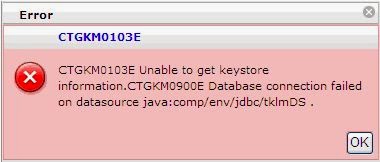
Before you can change the password of the DB2 Administrator user ID, you must change the password for the system user entry. To resolve the password sync issue follow these steps:
1. Log on to Tivoli Key Lifecycle Manager server as root.
2. Change user to the tklmdb2 system user entry. Type:
su <gc>tklmdb
3. Change the password. Type:
passwd
Specify the new password.
4. Exit back to root.
exit
5. In the TIP_HOME/bin directory, use the wsadmin interface that the WebSphere® Application Server provides to specify the Jython syntax.
./wsadmin.sh -username TIPAdmin -password mypwd -lang jython
6. Change the password for the WebSphere Application Server data source:
a. The following command lists the JAASAuthData entries:
wsadmin>print AdminConfig.list('JAASAuthData')
The result might like this example:
(cells/TIPCell|security.xml#JAASAuthData_1396539704930)
(cells/TIPCell|security.xml#JAASAuthData_1396539705604)
b. Type the AdminConfig.showall command for each entry, to locate the alias tklm_db. For example, type on one line:
print AdminConfig.showall ('(cells/TIPCell|security.xml#JAASAuthData_1396539704930)')
The result is like this example:
[alias tklmdb]
[description "TKLM database user J2C authentication alias"]
[password *****]
[userId ustklmdb]
And also type on one line:
print AdminConfig.showall ('(cells/TIPCell|security.xml#JAASAuthData_1396539705604)')
The result is like this example:
[alias tklm_db]
[description "TKLM database user j2c authentication alias"]
[password *****]
[userId ustklmdb]
c. Change the password for the tklm_db alias that has the identifier JAASAuthData_1396539705604:
print AdminConfig.modify('JAASAuthData_list_entry', '[[password passw0rdc]]'
For example, type on one line:
print AdminConfig.modify
('(cells/TIPCell|security.xml#JAASAuthData_1396539705604)',
'[[password <password>]]')
d. Change the password for the tklmdb alias that has the identifier JAASAuthData_1396539704930:
print AdminConfig.modify('JAASAuthData_list_entry', '[[password passw0rdc]]'
For example, type on one line:
print AdminConfig.modify
('(cells/TIPCell|security.xml#JAASAuthData_1396539704930)',
'[[password <password>]]')
e. Save the changes:
print AdminConfig.save()
f. Exit back to root.
exit
g. In the TIP_HOME/bin directory, stop the Tivoli Integrated Portal application. For example, as TIPAdmin, type on one line:
stopServer.sh server1 -username tipadmin -password passw0rd
The result is like this example:
ADMU0116I: Tool information is being logged in file
//opt/IBM/tivoli/tiptklmV2/profiles/TIPProfile/logs/server1/stopServer.log
ADMU0128I: Starting tool with the TIPProfile profile
ADMU3100I: Reading configuration for server: server1
ADMU3201I: Server stop request issued. Waiting for stop status.
ADMU4000I: Server server1 stop completed.
h. Start the Tivoli Integrated Portal application. As the Tivoli Integrated Portal administrator, type on one line:
startServer.sh server1
i. In the TIP_HOME/bin directory, use the wsadmin interface that the WebSphere Application Server provides to specify the Jython syntax.
./wsadmin.sh -username tipadmin -password mypwd -lang jython
j. Verify that you can connect to the database using the WebSphere Application Server data source.
i. First, query for a list of data sources. Type:
print AdminConfig.list('DataSource')
The result might be like this example:
"TKLM DataSource(cells/TIPCell/nodes/TIPNode/servers/server1|resources.xml#DataSource_1396539707355)"
"TKLM scheduler XA Datasource(cells/TIPCell/nodes/TIPNode/servers/server1|resources.xml#DataSource_1396539709814)"
"Tivoli Common Reporting Data Source(cells/TIPCell|resources.xml#DataSource_1396539473259)"
DefaultEJBTimerDataSource(cells/TIPCell/nodes/TIPNode/servers/server1|resources.xml#DataSource_1000001)
ttssdb(cells/TIPCell|resources.xml#DataSource_1396539429750)
ii. Type:
print AdminControl.testConnection('TKLM DataSource(cells....)')
For example, type on one line:
print AdminControl.testConnection (‘TKLM DataSource(cells/TIPCell/nodes/TIPNode/servers/server1|resources.xml#DataSource_1396539707355)')
iii. Test the connection on the remaining data source. For example, type:
print AdminControl.testConnection (‘TKLM scheduler XA Datasource(cells/TIPCell/nodes/TIPNode/servers/server1|resources.xml#DataSource_1396539709814)')
iv. In both cases, you receive a message that the connection to the data source was successful. For example:
WASX7217I: Connection to provided data source was successful.
Friday, August 15, 2014
TKLM and TSM Encryption
When it comes to encryption and TSM you find varying responses from admins. Some use the TSM server as the key manager, others implement a library based key manager, and others use a third party software product. In the past I used TSMs internal encryption key management option and while it is a set-it and forget it process it has some limitations when it comes to Exports and DB Backups. That is where third party software like TKLM can be beneficial. I have recently implemented TKLM and after some hiccups along the way am still undecided on whether I like it. If you use TKLM let me know your experience and if there are any issues of which I should be aware. I'll post my hiccups next week as they will take some time to discuss.
Thursday, August 7, 2014
Poor Performance Followup
As a follow-up to the previous poor performance post I thought I'd post what the outcome was. As it turns out we checked performance tuning settings in TSM and AIX and no performance increase was seen. We asked the DB2 admins to review any of their settings and they could not find any tunables that had not already been implemented. We sent in servermon.pl output and although they saw performance that was sub-par, they couldn't designate what was causing it. There are no server/adapter/switch/disk/tape errors so nothing emerged as the culprit for our poor throughput performance.
So we reviewed the backup time of each TSM storage agent server used to backup this 101 TB SAP database. At the time the storage agents that perform the backup consisted of 5 LPARS, 4 of those in a single frame each with their own assigned I/O drawer. The 5th was in a separate 740 frame with its own I/O drawer. The 5th storage agent was completing the backup in a fraction of the time of the other 4 so we concluded we must be overloading the CEC on the 740. We moved one of the four storage agents out of the frame to a secondary frame and the results were awesome. See below:

You'll notice that the backup time didn't change with the update of the tape drives from E06 to E07. Hardware layout matters more than the performance of the tape drives. When a vendor tells you just updating the hardware to newer iterations will increase performance take it will a grain of salt. In our case we did testing of the new tape drives and no performance gains were seen but the go ahead was given to upgrade to the newer hardware and as you'll see we didn't gain anything until we reworked the environment. Our task now is to identify how to increase TSM internal job performance (i.e. migration and storage pool backup) which has not seen significant performance gains from the tape upgrades.
So we reviewed the backup time of each TSM storage agent server used to backup this 101 TB SAP database. At the time the storage agents that perform the backup consisted of 5 LPARS, 4 of those in a single frame each with their own assigned I/O drawer. The 5th was in a separate 740 frame with its own I/O drawer. The 5th storage agent was completing the backup in a fraction of the time of the other 4 so we concluded we must be overloading the CEC on the 740. We moved one of the four storage agents out of the frame to a secondary frame and the results were awesome. See below:
You'll notice that the backup time didn't change with the update of the tape drives from E06 to E07. Hardware layout matters more than the performance of the tape drives. When a vendor tells you just updating the hardware to newer iterations will increase performance take it will a grain of salt. In our case we did testing of the new tape drives and no performance gains were seen but the go ahead was given to upgrade to the newer hardware and as you'll see we didn't gain anything until we reworked the environment. Our task now is to identify how to increase TSM internal job performance (i.e. migration and storage pool backup) which has not seen significant performance gains from the tape upgrades.
Wednesday, April 23, 2014
IBM Tivoli Storage Manager is NOT affected by the OpenSSL Heartbleed vulnerability
I was asked to check into the Heartbleed bug and whether TSM was vulnerable. A quick google of TSM Heartbleed produced the following link which states:
IBM Tivoli Storage Manager is NOT affected by the OpenSSL Heartbleed vulnerability
Wednesday, July 31, 2013
IBM P7 Strange Behaviour
We have a P7 frame that has 4 LPARs that are used as TSM storage agents from which snapshots of our SAP DB's are mounted for backup. They have always had great performance until one LPAR had a bad HBA that phoned home and was replaced. After it was replaced performance for backups dramatically decreased from 800MB/s to 150MB/s and overall performance of the server would drastically drop. When the DB requiring backup is over 25TB that is a huge hit, and we could not find the root cause. At first IBM said it was our Hitachi disk that was the problem. We eliminated that right away, so we then replaced the new HBA, checked our fiber, and then checked the GBIC and nothing seemed to fix the situation. During the first week I asked the IBM service technician if we could possibly have a bad drawer or slot and he emphatically said "No! If you did you would have errors all over the place." So we checked firmware, we moved cards within the frame (again), we double checked the fiber, now we were going into the third week. So I kept asking if something could be wrong with the drawer/slots and I kept getting the same answer. The reason I suggested it was due to previous experience. I have seen hardware go bad without totally going "out". So after exhausting everything other than the replacing the slots, IBM finally replaced the slots. Viola! Backup speeds went back to normal and system degradation during the backup disappeared. So the slots/drawer was the issue. No errors relating to a slot/drawer hardware issue occurred but something caused the slots to degrade performance. It took almost a month to resolve the issue, I wouldn't say that IBM support was very thorough and at times tried to push off the problem to other vendors (i.e. Hitachi). I can only suggest in the future you trust your instincts and push the CE's to follow down every avenue. My headache is over, but now the RCA begins.
Friday, May 31, 2013
TSM 7
I recently attended a technical briefing from IBM of various storage related topics which included TSM. While they did have an NDA I can say that some of the items we discussed showed promise. I'll be able to discuss more after IBM Pulse this month, but what I can say is that the new Admin Center is pretty slick. It has some nice features and will finally make up for the folly that was the ISC. IBM stressed that they are listening to users and taking their requests and suggestions to try and develop a tool everyone will find useful. That was surprising news seeing as how the majority of people complained about the ISC and it took 7+ years to finally get a replacement. I will say this in defense of the TSM developers, a lot of the ISC push came from above and they were somewhat forced into that fiasco. TSM 7 DB will scale larger and handle more objects and they are really ramping up the capabilities of the client deployment module. More info to come in the next couple weeks.
One item that did come up was the issue of Export and Backup Set tapes being unencrypted from TSM due to the key issue. What I suggested was that they allow TSM servers to backup each others keys and also utilize them so Exports and Backup-Sets could be encrypted, but still shared between TSM servers. Hope they find some way to add that capability.
We did have a Protectier review and it has a lot of promise. I know I have been a Data Domain fanboy for some time. While I didn't see anything that integrated Protectier DeDupe with TSM directly it did show some nice growth capabilities. I'm excited to see how well it works, but I'm fighting a study that shows tape still is the more cost effective backup solution.
I'll post more once PULSE is complete (mid-June) so stay tuned!
One item that did come up was the issue of Export and Backup Set tapes being unencrypted from TSM due to the key issue. What I suggested was that they allow TSM servers to backup each others keys and also utilize them so Exports and Backup-Sets could be encrypted, but still shared between TSM servers. Hope they find some way to add that capability.
We did have a Protectier review and it has a lot of promise. I know I have been a Data Domain fanboy for some time. While I didn't see anything that integrated Protectier DeDupe with TSM directly it did show some nice growth capabilities. I'm excited to see how well it works, but I'm fighting a study that shows tape still is the more cost effective backup solution.
I'll post more once PULSE is complete (mid-June) so stay tuned!
Thursday, January 31, 2013
Tivoli Storage Manager Next Administrative Interface / Beta Programme
It'll be called: Operations Center (a bit sounds like admincenter ;-) I hope they didn't only change the design!
Wednesday, January 9, 2013
Do Large Corporations Need Tape?
I am dealing with a situation where I have to gone from a tapeless TSM environment to the standard TSM tape model and I have to wonder why you would use tape when you have multiple data centers? If you have multiple data centers why not backup to disk and replicate the data on disk to a disk solution at the alternate DC? I did this with Data Domains and it made life so much easier. Multiple DR tests showed it was efficient and successful, of course this also utilized deduplication so disk usage and costs didn't get out of hand. So I ask why is any large corporation still using tape?
Wednesday, December 5, 2012
TSM Explorer v6.3
Siberia Software has released TSMExplorer (ver 6.3). TSMExplorer and TSMExplorer Collector are an easy and powerful product for managing and monitoring IBM Tivoli Storage Manager. The product allows you to manage many TSM servers from a single sign-on and supports Linux, Windows, and Mac OS X.
Check out the demos:
or go to the main site:
http://www.s-iberia.com
Wednesday, November 28, 2012
Thursday, November 15, 2012
STORServer Console 3.0 Released
If you are looking for a TSM management console STORServer has released v3.0 of their console. I have not had the opportunity to use it, but if any reader out their has experience with the product and would like to post a review I will be more than willing to allow it. You can read more about the STORServer Console here.
Thursday, May 10, 2012
Client Lockdown
A directive came down for 75+ windows servers to be "locked down" when it came to accessing their backup data. The TSM client will allow anyone to open the client GUI and restore files with which they have permission. So I considered the various ways to keep anyone from accessing TSM and restoring data; we could set permissions on the GUI and command line to not allow executing unless in the admin group, We could delete the command line and GUI executable, or we could simply set the SESSIONINIT option on the server. After weighing the options the SESSIONINIT was the easier and most direct way to keep anyone but a TSM admin from restoring data. Once SESSIONINIT is set the TSM client GUI, command line, and web GUI will not be allowed to initiate a session. All restores will have to be executed through a schedule from the TSM server. Of course you can temporarily turn SESSIONINIT off, but only a TSM admin can do so, making it easier to track who's accessed the data.
(Note: SESSIONINIT does not support the CAD)
The problem was how to update 75+ Windows servers options file and then restart the TSM Scheduler. So you can change any MANAGEDSERVICES options to WEBCLIENT using a client option set, but SESSIONINIT is another problem. As it turns out, if you set SESSIONINIT on the TSM server you have to put the HLAddress and LLAddress in the node definition on the server. The client dsm.opt must have the TCPCLIENTADDRESS and TCPCLIENTPORT in the dsm.opt. What we didn't know was that we also had to put SESSIONINIT SERVERONLY in the dsm.opt also. If you set SESSIONINIT on the TSM server and not on the client and the scheduler was defined with /validate:yes then you will get "password" errors and the scheduler will crash. The reason for this is that TSM does not allow client initiated sessions, but the scheduler when started is trying to validate its password. Since the scheduler can't validate the password it fails similar to when the password has not been set when using PASSWORDACCESS GENERATE.
We had the TCP Client settings, but adding SESSIONINIT to all 75+ servers would have been a chore...unless you know how to use the Windows command prompt and dsmcutil. Here's how I added the SESSIONINIT option to all 75 servers.
Example of how to remotely add a line to the dsm.opt
c:\echo SESSIONINIT SERVERONLY >> \\WINSERVPRD20\C$\progra~1\tivoli\tsm\baclient\dsm.opt
(Note: SESSIONINIT does not support the CAD)
The problem was how to update 75+ Windows servers options file and then restart the TSM Scheduler. So you can change any MANAGEDSERVICES options to WEBCLIENT using a client option set, but SESSIONINIT is another problem. As it turns out, if you set SESSIONINIT on the TSM server you have to put the HLAddress and LLAddress in the node definition on the server. The client dsm.opt must have the TCPCLIENTADDRESS and TCPCLIENTPORT in the dsm.opt. What we didn't know was that we also had to put SESSIONINIT SERVERONLY in the dsm.opt also. If you set SESSIONINIT on the TSM server and not on the client and the scheduler was defined with /validate:yes then you will get "password" errors and the scheduler will crash. The reason for this is that TSM does not allow client initiated sessions, but the scheduler when started is trying to validate its password. Since the scheduler can't validate the password it fails similar to when the password has not been set when using PASSWORDACCESS GENERATE.
We had the TCP Client settings, but adding SESSIONINIT to all 75+ servers would have been a chore...unless you know how to use the Windows command prompt and dsmcutil. Here's how I added the SESSIONINIT option to all 75 servers.
Example of how to remotely add a line to the dsm.opt
c:\echo SESSIONINIT SERVERONLY >> \\WINSERVPRD20\C$\progra~1\tivoli\tsm\baclient\dsm.opt
I put the command for all 75 into a batch file and ran it looking for errors (not all our servers had TSM installed in the default location). Then I used the dsmcutil command to stop and start the TSM scheduler remotely.
Example of stopping and starting the TSM Scheduler service
c:\C:\progra~1\tivoli\tsm\baclient\dsmcutil stop /name:"TSM Client Acceptor" /machine:WINSERVPRD20
c:\C:\progra~1\tivoli\tsm\baclient\dsmcutil start /name:"TSM Client Acceptor" /machine:WINSERVPRD20
I needed to restart the scheduler on all 75 servers so once again I created a Windows command line batch file with the following commands in a list and it restarted all 75 quickly and easily from my own desktop.
Monday, April 30, 2012
DBMEMPERCENT...Where'd That Come From?
I was having performance issues with a couple TSM 6.2 servers and could not find anything that pointed to the issue. I'm not one to call support unless I'm totally stumped and cannot find help through the web, but this time I finally relented and made the call. The issue was problems with backups failing repeatedly and when researched we were getting internal server errors along with DB table errors. IBM support asked for some DB2 log files and within 30 or so minutes had identified the problem.
TSM has a server option I have never used or heard of that had somehow been set that adversely affected all backups. Somehow the option DBMEMPERCENT was set in the dsmserv.opt file. This option tells TSM what percentage of the overall server's memory it can allocate for use. The default is AUTO and would have been fine, but somehow DBMEMPERCENT was set to 10 in the dsmserv.opt. Which means out of 16GB of RAM I was only using 1.6GB?!?!? How'd that happen? I didn't set it, none of my coworkers remember setting it, so where did it come from? IBM support stated the default was AUTO so the option was manually set. Since I had never used this option and its 6.x specific, I never would have looked for it. Good thing I called support.
TSM has a server option I have never used or heard of that had somehow been set that adversely affected all backups. Somehow the option DBMEMPERCENT was set in the dsmserv.opt file. This option tells TSM what percentage of the overall server's memory it can allocate for use. The default is AUTO and would have been fine, but somehow DBMEMPERCENT was set to 10 in the dsmserv.opt. Which means out of 16GB of RAM I was only using 1.6GB?!?!? How'd that happen? I didn't set it, none of my coworkers remember setting it, so where did it come from? IBM support stated the default was AUTO so the option was manually set. Since I had never used this option and its 6.x specific, I never would have looked for it. Good thing I called support.
Wednesday, November 16, 2011
Tivoli Storage Manager Reporting and Monitoring v6.3
This is a query from the TSM v6.3 agent:
select node_name, count(distinct volume_name) from volumeusage a, stgpools b where (a.stgpool_name=b.stgpool_name) and devclass in (select DEVCLASS_NAME from devclasses where devtype in ('3570','3590','3592','4MM','8MM','DLT','DTF','ECARTRIDGE','GENERICTAPE','LTO','QIC')) group by node_name
Could you run it on a TSM v5.x.x.x productive system for me!
Do you get any result in 10 minutes?
select node_name, count(distinct volume_name) from volumeusage a, stgpools b where (a.stgpool_name=b.stgpool_name) and devclass in (select DEVCLASS_NAME from devclasses where devtype in ('3570','3590','3592','4MM','8MM','DLT','DTF','ECARTRIDGE','GENERICTAPE','LTO','QIC')) group by node_name
Could you run it on a TSM v5.x.x.x productive system for me!
Do you get any result in 10 minutes?
Friday, August 26, 2011
Thursday, August 4, 2011
Archiving The Actlog
I just had a friend e-mail me and state he was being contacted by his previous employer complaining he made changes to their TSM retention times causing them to lose data. The TSM admin who took over is blaming him stating he changed the retention and now the data is gone. My friend does not remember making any retention changes and the problem is that any change to the copygroup updates the "Last Update by (administrator)" and the "Last Update Date/Time" so it's not substantial evidence of who did what. The only way to verify what had really occurred would be to either keep the actlog for an extremely long period of time, or dump it to a text file that you zip and archive. (Even then it's a text file and could be tampered with) In the case of my friend, he left the company last November and anyone could have altered the copygroup since then.
How many of you archive your TSM Activity Log, and how long do you keep it for? Obviously it good for security and tracking purposes, but who manages it and can you reliably keep it in a read-only state? Of course this is also a case where a bi-monthly audit of retention settings would have helped.
How many of you archive your TSM Activity Log, and how long do you keep it for? Obviously it good for security and tracking purposes, but who manages it and can you reliably keep it in a read-only state? Of course this is also a case where a bi-monthly audit of retention settings would have helped.
Subscribe to:
Posts (Atom)